
Menu
▾
▴
gnuplot-info — For questions and discussion about gnuplot
You can subscribe to this list here.
| 2003 |
Jan
|
Feb
|
Mar
|
Apr
|
May
|
Jun
|
Jul
|
Aug
|
Sep
|
Oct
(2) |
Nov
(2) |
Dec
|
|---|---|---|---|---|---|---|---|---|---|---|---|---|
| 2004 |
Jan
(3) |
Feb
(1) |
Mar
(2) |
Apr
(22) |
May
(52) |
Jun
(43) |
Jul
(36) |
Aug
(59) |
Sep
(37) |
Oct
(55) |
Nov
(39) |
Dec
(36) |
| 2005 |
Jan
(64) |
Feb
(40) |
Mar
(62) |
Apr
(58) |
May
(256) |
Jun
(77) |
Jul
(80) |
Aug
(39) |
Sep
(56) |
Oct
(36) |
Nov
(113) |
Dec
(68) |
| 2006 |
Jan
(43) |
Feb
(64) |
Mar
(69) |
Apr
(60) |
May
(71) |
Jun
(53) |
Jul
(63) |
Aug
(63) |
Sep
(76) |
Oct
(85) |
Nov
(82) |
Dec
(73) |
| 2007 |
Jan
(75) |
Feb
(82) |
Mar
(84) |
Apr
(104) |
May
(67) |
Jun
(101) |
Jul
(107) |
Aug
(138) |
Sep
(128) |
Oct
(106) |
Nov
(112) |
Dec
(112) |
| 2008 |
Jan
(94) |
Feb
(87) |
Mar
(146) |
Apr
(169) |
May
(75) |
Jun
(26) |
Jul
(26) |
Aug
(7) |
Sep
(18) |
Oct
(53) |
Nov
(42) |
Dec
(19) |
| 2009 |
Jan
(43) |
Feb
(39) |
Mar
(18) |
Apr
(45) |
May
(66) |
Jun
(87) |
Jul
(56) |
Aug
(41) |
Sep
(56) |
Oct
(139) |
Nov
(98) |
Dec
(88) |
| 2010 |
Jan
(81) |
Feb
(79) |
Mar
(83) |
Apr
(97) |
May
(124) |
Jun
(84) |
Jul
(53) |
Aug
(85) |
Sep
(89) |
Oct
(50) |
Nov
(98) |
Dec
(78) |
| 2011 |
Jan
(97) |
Feb
(74) |
Mar
(68) |
Apr
(54) |
May
(63) |
Jun
(59) |
Jul
(65) |
Aug
(58) |
Sep
(37) |
Oct
(40) |
Nov
(59) |
Dec
(35) |
| 2012 |
Jan
(16) |
Feb
(56) |
Mar
(63) |
Apr
(25) |
May
(48) |
Jun
(58) |
Jul
(20) |
Aug
(13) |
Sep
(43) |
Oct
(35) |
Nov
(20) |
Dec
(17) |
| 2013 |
Jan
(22) |
Feb
(11) |
Mar
(51) |
Apr
(34) |
May
(57) |
Jun
(27) |
Jul
(70) |
Aug
(30) |
Sep
(38) |
Oct
(53) |
Nov
(40) |
Dec
(25) |
| 2014 |
Jan
(26) |
Feb
(35) |
Mar
(60) |
Apr
(12) |
May
(17) |
Jun
(15) |
Jul
(9) |
Aug
(18) |
Sep
(46) |
Oct
(18) |
Nov
(19) |
Dec
(15) |
| 2015 |
Jan
(17) |
Feb
(28) |
Mar
(21) |
Apr
(54) |
May
(36) |
Jun
(8) |
Jul
(30) |
Aug
(13) |
Sep
(3) |
Oct
(28) |
Nov
(3) |
Dec
(3) |
| 2016 |
Jan
(11) |
Feb
(9) |
Mar
(29) |
Apr
(10) |
May
(8) |
Jun
(5) |
Jul
(50) |
Aug
(57) |
Sep
(13) |
Oct
(5) |
Nov
(17) |
Dec
(11) |
| 2017 |
Jan
(3) |
Feb
(23) |
Mar
(16) |
Apr
(7) |
May
(15) |
Jun
(12) |
Jul
(48) |
Aug
(15) |
Sep
(3) |
Oct
(20) |
Nov
(28) |
Dec
(21) |
| 2018 |
Jan
(13) |
Feb
(21) |
Mar
(21) |
Apr
(7) |
May
(3) |
Jun
(7) |
Jul
(27) |
Aug
(38) |
Sep
(4) |
Oct
(30) |
Nov
(22) |
Dec
|
| 2019 |
Jan
(5) |
Feb
(16) |
Mar
(1) |
Apr
(9) |
May
(7) |
Jun
(20) |
Jul
(13) |
Aug
(3) |
Sep
(2) |
Oct
(2) |
Nov
(2) |
Dec
(4) |
| 2020 |
Jan
(6) |
Feb
(11) |
Mar
(1) |
Apr
(18) |
May
(4) |
Jun
(5) |
Jul
(12) |
Aug
(1) |
Sep
(3) |
Oct
(7) |
Nov
(1) |
Dec
(17) |
| 2021 |
Jan
(1) |
Feb
(11) |
Mar
(16) |
Apr
(6) |
May
(5) |
Jun
(1) |
Jul
(1) |
Aug
(2) |
Sep
(8) |
Oct
(10) |
Nov
(4) |
Dec
(4) |
| 2022 |
Jan
(9) |
Feb
(35) |
Mar
(4) |
Apr
|
May
(3) |
Jun
(49) |
Jul
(11) |
Aug
|
Sep
(5) |
Oct
(2) |
Nov
(16) |
Dec
(13) |
| 2023 |
Jan
|
Feb
(8) |
Mar
(3) |
Apr
|
May
(8) |
Jun
|
Jul
(5) |
Aug
|
Sep
|
Oct
(2) |
Nov
|
Dec
(2) |
| 2024 |
Jan
(6) |
Feb
(9) |
Mar
|
Apr
(26) |
May
(24) |
Jun
|
Jul
(4) |
Aug
(2) |
Sep
(1) |
Oct
(10) |
Nov
(9) |
Dec
|
| 2025 |
Jan
|
Feb
(22) |
Mar
|
Apr
(1) |
May
|
Jun
|
Jul
|
Aug
|
Sep
(1) |
Oct
(1) |
Nov
|
Dec
(4) |
| 2026 |
Jan
|
Feb
(24) |
Mar
(20) |
Apr
(13) |
May
|
Jun
|
Jul
|
Aug
|
Sep
|
Oct
|
Nov
|
Dec
|
|
From: Reginald B. <pul...@ya...> - 2026-02-10 14:37:09
|
 Norwid,
Thank you for a such a detailed answer.  It's not my data.  I'm trying to help someone else and got in over my head.
I will buy the book as I am a long time gnuplot fan.
Have Fun!Reg
    On Monday, February 9, 2026 at 04:14:24 PM CST, Norwid Behrnd <nb...@ya...> wrote:

 Dear Reginald

There are two issues with the data shared by you. 1) There are 16 min between
the first, and the second measurement; subsequently, the interval is 1 min
only.  Either clip the data (and explain why you did), or recollect the data
equidistant in time.

2) Dependent values of column 6 are _much_ away from the values of column 4,
5, and somewhat 7; and again a column 8 and 9. Either break the ordinate, use
a secondary ordinate, or use multiple sub figures to illustrate your findings.
By recollection, the second edition of "Gnuplot in Action" includes inspiring
colorful examples including the corresponding source code.

But since your question is about to get the proverbial foot into the door, I
clipped the raw data to have a file `data.dat`

```data.dat
2 2026/02/05 20:57 26.8 38.02 983.32 13.54 0.21 2.76
3 2026/02/05 20:58 26.81 38.01 983.29 13.55 0.07 2.75
4 2026/02/05 20:59 26.81 38.0 983.28 13.55 0.19 2.75
5 2026/02/05 21:00 26.81 37.98 983.33 13.55 0.21 2.8
6 2026/02/05 21:01 26.81 37.99 983.34 13.55 0.21 2.81
```

with the 9 columns per line separated by one explicit white space.  With focus
on column 8 and 9, my MRE `proximo.gp` is

```proximo.gp
set terminal png
set title "test"
set output "test.png"

set datafile separator whitespace

set xdata time
set timefmt "%Y/%m/%d %H:%M"
set format x ""    # let xticlabels define what is printed
set xtics out nomirror

set format y "%.2f"
set ylabel "values"

# helper: build a two-line label "YYYY/MM/DD\nHH:MM"
lab(i) = sprintf("%s\n%s", strcol(2), strcol(3))

plot "data_02.dat" using (timecolumn(2, "%Y/%m/%d") + \
        timecolumn(3, " %H:%M")):8:xticlabels(lab($0)) \
        with lines title "col8", \
  "" using (timecolumn(2, "%Y/%m/%d") + \
      timecolumn(3, " %H:%M")):9 with lines title "col9"

```

to yield the illustration (`test.png`) attached by the call of

```bash
$ gnuplot proximo.gp
```

with gnuplot version gnuplot 6.0 patchlevel 3 as currently packaged for Linux
Debian 14/forky (branch testing).  I added a couple of backslashes to break
lines otherwise the email editor would break visually (and in consequence, in
function).  One can do better (e.g., increase of the canvas dimension -- I
forgot how -- to prevent the time marks so close to the border), though.

Regards,
Norwid

https://www.manning.com/books/gnuplot-in-action-second-edition
|
|
From: Norwid B. <nb...@ya...> - 2026-02-09 22:34:55
|
Dear Reginald

There are two issues with the data shared by you. 1) There are 16 min between
the first, and the second measurement; subsequently, the interval is 1 min
only.  Either clip the data (and explain why you did), or recollect the data
equidistant in time.

2) Dependent values of column 6 are _much_ away from the values of column 4,
5, and somewhat 7; and again a column 8 and 9. Either break the ordinate, use
a secondary ordinate, or use multiple sub figures to illustrate your findings.
By recollection, the second edition of "Gnuplot in Action" includes inspiring
colorful examples including the corresponding source code.

But since your question is about to get the proverbial foot into the door, I
clipped the raw data to have a file `data.dat`

```data.dat
2 2026/02/05 20:57 26.8 38.02 983.32 13.54 0.21 2.76
3 2026/02/05 20:58 26.81 38.01 983.29 13.55 0.07 2.75
4 2026/02/05 20:59 26.81 38.0 983.28 13.55 0.19 2.75
5 2026/02/05 21:00 26.81 37.98 983.33 13.55 0.21 2.8
6 2026/02/05 21:01 26.81 37.99 983.34 13.55 0.21 2.81
```

with the 9 columns per line separated by one explicit white space.  With focus
on column 8 and 9, my MRE `proximo.gp` is

```proximo.gp
set terminal png
set title "test"
set output "test.png"

set datafile separator whitespace

set xdata time
set timefmt "%Y/%m/%d %H:%M"
set format x ""    # let xticlabels define what is printed
set xtics out nomirror

set format y "%.2f"
set ylabel "values"

# helper: build a two-line label "YYYY/MM/DD\nHH:MM"
lab(i) = sprintf("%s\n%s", strcol(2), strcol(3))

plot "data_02.dat" using (timecolumn(2, "%Y/%m/%d") + \
         timecolumn(3, " %H:%M")):8:xticlabels(lab($0)) \
         with lines title "col8", \
   "" using (timecolumn(2, "%Y/%m/%d") + \
      timecolumn(3, " %H:%M")):9 with lines title "col9"

```

to yield the illustration (`test.png`) attached by the call of

```bash
$ gnuplot proximo.gp
```

with gnuplot version gnuplot 6.0 patchlevel 3 as currently packaged for Linux
Debian 14/forky (branch testing).  I added a couple of backslashes to break
lines otherwise the email editor would break visually (and in consequence, in
function).  One can do better (e.g., increase of the canvas dimension -- I
forgot how -- to prevent the time marks so close to the border), though.

Regards,
Norwid

https://www.manning.com/books/gnuplot-in-action-second-edition
|
|
From: Reginald B. <pul...@ya...> - 2026-02-09 17:25:28
|
I've tried modifying timedat.dem to plot the following without success: 1 2026/02/05 20:41 26.81 38.09 983.28 13.53 0.17 2.77 2 2026/02/05 20:57 26.8 38.02 983.32 13.54 0.21 2.76 3 2026/02/05 20:58 26.81 38.01 983.29 13.55 0.07 2.75 4 2026/02/05 20:59 26.81 38.0 983.28 13.55 0.19 2.75 5 2026/02/05 21:00 26.81 37.98 983.33 13.55 0.21 2.8 6 2026/02/05 21:01 26.81 37.99 983.34 13.55 0.21 2.81 I volunteered to help someone else and painted myself in a corner. Would like to show time and date on the X axis. The first demo would be fine, but I've not been able to reformat the data into something gnuplot will accept. Not clear whytimedat.dat works and my version won't Thanks,Reg |
|
From: Robert H. <he...@de...> - 2026-02-08 16:43:56
|
At Sun, 8 Feb 2026 07:17:35 -0500 (EST) Robert Heller <he...@de...> wrote: > > None of this helps. The X Tick labels are still the numberical indexes and > not the text in column of the data file. > I found my problem: doing "1:xtick(1)" is wrong! I moved the ":xtic(1)" elsewhere in the using list and presto, things work. > At Sun, 8 Feb 2026 11:38:29 +0100 Norwid Behrnd <nb...@ya...> wrote: > > > > > Dear Robert > > > > The example shared by you includes three consecutive lines relevant to the > > management of xtics: > > > > > set xtics border in scale 0,0 nomirror rotate by -45 autojustify > > > set xtics norangelimit > > > set xtics () > > > > By `set xtics scale 0,0` you however set them invisible. Compare for example > > the result of > > > > ``` > > set terminal png > > set output "test_01.png" > > set title "test 01" > > > > set xtics in scale 0,0 > > plot sin(x) > > ``` > > > > with (an exaggerated example) > > > > ``` > > set terminal png > > set output "test_02.png" > > set title "test 02" > > > > set xtics in scale 10,0 > > plot sin(x) > > ``` > > > > Equally, compare with the first example "US immigration from Europe by decade" > > on <https://gnuplot.sourceforge.net/demo_5.4/histograms2.html> -- sometimes the > > tics extend beyond the bars (e.g., 1931--1940, Northern Europe) to be visible, > > while e.g., about 1901--1910 they are not. Here, `set xtics out` yields xtics > > which don't enter the first quadrant and hence are not affected by the > > histogram's bars. > > > > In your example, the annotations to the abscissa are short; this is the reason > > why I think to use `set xtics out` without a `rotate by -45` provides a result > > easier to read and > > > > ``` > > set xtics out border nomirror autojustify > > set xtics norangelimit > > ``` > > > > might suffice. Note `set xtics ()` can void your earlier list of instructions > > about the xtics. > > > > Best regards, > > > > Norwid > > > > > > > -- Robert Heller -- Cell: 413-658-7953 GV: 978-633-5364 Deepwoods Software -- Custom Software Services http://www.deepsoft.com/ -- Linux Administration Services he...@de... -- Webhosting Services |
|
From: Robert H. <he...@de...> - 2026-02-08 15:56:11
|
None of this helps. The X Tick labels are still the numberical indexes and not the text in column of the data file. At Sun, 8 Feb 2026 11:38:29 +0100 Norwid Behrnd <nb...@ya...> wrote: > > Dear Robert > > The example shared by you includes three consecutive lines relevant to the > management of xtics: > > > set xtics border in scale 0,0 nomirror rotate by -45 autojustify > > set xtics norangelimit > > set xtics () > > By `set xtics scale 0,0` you however set them invisible. Compare for example > the result of > > ``` > set terminal png > set output "test_01.png" > set title "test 01" > > set xtics in scale 0,0 > plot sin(x) > ``` > > with (an exaggerated example) > > ``` > set terminal png > set output "test_02.png" > set title "test 02" > > set xtics in scale 10,0 > plot sin(x) > ``` > > Equally, compare with the first example "US immigration from Europe by decade" > on <https://gnuplot.sourceforge.net/demo_5.4/histograms2.html> -- sometimes the > tics extend beyond the bars (e.g., 1931--1940, Northern Europe) to be visible, > while e.g., about 1901--1910 they are not. Here, `set xtics out` yields xtics > which don't enter the first quadrant and hence are not affected by the > histogram's bars. > > In your example, the annotations to the abscissa are short; this is the reason > why I think to use `set xtics out` without a `rotate by -45` provides a result > easier to read and > > ``` > set xtics out border nomirror autojustify > set xtics norangelimit > ``` > > might suffice. Note `set xtics ()` can void your earlier list of instructions > about the xtics. > > Best regards, > > Norwid > > > -- Robert Heller -- Cell: 413-658-7953 GV: 978-633-5364 Deepwoods Software -- Custom Software Services http://www.deepsoft.com/ -- Linux Administration Services he...@de... -- Webhosting Services |
|
From: Norwid B. <nb...@ya...> - 2026-02-08 11:29:36
|
Dear Robert The example shared by you includes three consecutive lines relevant to the management of xtics: > set xtics border in scale 0,0 nomirror rotate by -45 autojustify > set xtics norangelimit > set xtics () By `set xtics scale 0,0` you however set them invisible. Compare for example the result of ``` set terminal png set output "test_01.png" set title "test 01" set xtics in scale 0,0 plot sin(x) ``` with (an exaggerated example) ``` set terminal png set output "test_02.png" set title "test 02" set xtics in scale 10,0 plot sin(x) ``` Equally, compare with the first example "US immigration from Europe by decade" on <https://gnuplot.sourceforge.net/demo_5.4/histograms2.html> -- sometimes the tics extend beyond the bars (e.g., 1931--1940, Northern Europe) to be visible, while e.g., about 1901--1910 they are not. Here, `set xtics out` yields xtics which don't enter the first quadrant and hence are not affected by the histogram's bars. In your example, the annotations to the abscissa are short; this is the reason why I think to use `set xtics out` without a `rotate by -45` provides a result easier to read and ``` set xtics out border nomirror autojustify set xtics norangelimit ``` might suffice. Note `set xtics ()` can void your earlier list of instructions about the xtics. Best regards, Norwid |
|
From: Robert H. <he...@de...> - 2026-02-07 20:47:25
|
I downloaded the file at https://gnuplot.sourceforge.net/demo_5.4/histograms.2.gnu and edited to suit my data file: #!/usr/bin/gnuplot -persist set datafile separator comma set datafile columnheaders set boxwidth 0.9 absolute set style fill solid 1.00 border lt -1 set key fixed right top vertical Right noreverse noenhanced autotitle nobox set style histogram clustered gap 1 title textcolor lt -1 unset parametric set datafile missing '-' set style data histograms set xtics border in scale 0,0 nomirror rotate by -45 autojustify set xtics norangelimit set xtics () set title "Wendell Website Landing Pages" set xrange [ * : * ] noreverse writeback set x2range [ * : * ] noreverse writeback set yrange [ 0.00000 : 7000. ] noreverse writeback set y2range [ * : * ] noreverse writeback set zrange [ * : * ] noreverse writeback set cbrange [ * : * ] noreverse writeback set rrange [ * : * ] noreverse writeback set colorbox vertical origin screen 0.9, 0.2 size screen 0.05, 0.6 front noinvert bdefault NO_ANIMATION = 1 plot "WendellWebsite-Jan1-Dec31-2025-Landing_page_Landing_page.csv" \ using 1:xticlabels(1), '' u 2 ti col, '' u 3 ti col, '' u 4 ti col But while it *mostly* works, it does not do the xtic labels, as shown in this screen shot: https://www.deepsoft.com/wp-content/uploads/2026/02/Screenshot-from-2026-02-07-15-41-28.png What am I doing wrong? The data file looks like this: # ---------------------------------------- # Landing page: Landing page # Account: www.wendellmass.us # Property: http://www.wendellmass.us - GA4 # ---------------------------------------- # # All Users # Start date: 20250101 # End date: 20251231 Landing page,Sessions,Active users,New users,Average engagement time per session,Key events,Total revenue,Session key event rate /,6936,3766,3239,71.99423298731257,0,0,0 (not set),1972,1005,0,12.278904665314402,0,0,0 /departments/library,1629,1092,918,36.09821976672806,0,0,0 /departments/recycling-and-transfer-station,1282,842,682,23.013260530421217,0,0,0 /town-government,543,273,175,93.43093922651934,0,0,0 /departments/public-meetings,397,160,86,69.7632241813602,0,0,0 /departments,367,304,211,116.20708446866485,0,0,0 /departments/property-assessment,351,291,233,34.69230769230769,0,0,0 /online-payment-bill-lookup,351,219,156,26.974358974358974,0,0,0 /departments/tax-collector,316,220,150,42.08227848101266,0,0,0 /departments/building-department,304,170,117,66.35197368421052,0,0,0 /departments/town-clerk,233,176,112,37.927038626609445,0,0,0 /good-neighbors,228,179,151,38.31140350877193,0,0,0 /jobs,223,182,144,27.60089686098655,0,0,0 -- Robert Heller -- Cell: 413-658-7953 GV: 978-633-5364 Deepwoods Software -- Custom Software Services http://www.deepsoft.com/ -- Linux Administration Services he...@de... -- Webhosting Services |
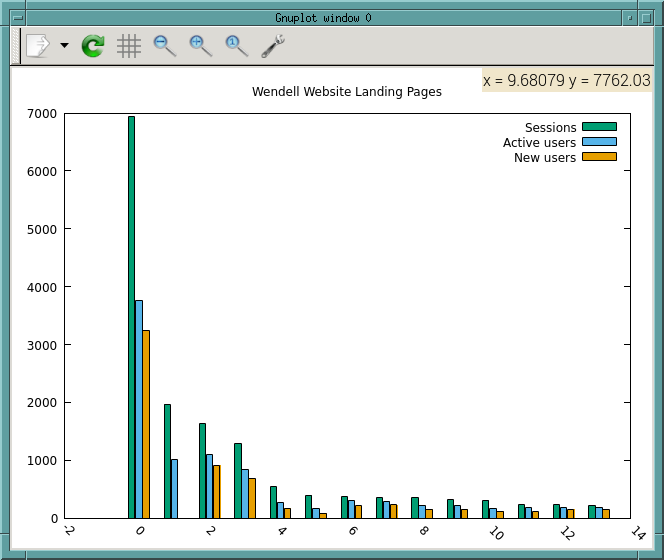
|
From: Wolfgang D. <wol...@da...> - 2025-12-28 10:08:32
|
Dear Gnuplot-team, until 6.0.3 you released Gnuplot for Windows also as ZIP/7z files (gp603-win64-mingw.zip / gp603-win64-mingw.7z) - do you plan that for 6.0.4 too? Or only the exe-installer? Best regards, Wolfgang |
|
From: Ethan M. <eam...@gm...> - 2025-12-03 18:59:36
|
set object circle at screen 0.9,screen 0.9 size 0.2 \
      fillstyle solid border lc rgb "#000000" fillcolor "orange"

On Wed, Dec 3, 2025 at 10:46 AM Geoff Kaniuk <ge...@ka...> wrote:
>
> I wish to plot a coloured disc outside the plot area.
>
> For example, the set object command:
>      set object circle at screen 0.9,screen 0.9 size 0.2 fc rgb "#000000"
> produced a circle with black boundary, white interior.
>
> fc is the fillcolor
>
> Is there an option to set the interior of the circle to any chosen colour?
> --
> Geoff
>
>
>
> _______________________________________________
> gnuplot-info mailing list
> gnu...@li...
> Membership management via: https://lists.sourceforge.net/lists/listinfo/gnuplot-info
|
|
From: Geoff K. <ge...@ka...> - 2025-12-03 18:46:09
|
I wish to plot a coloured disc outside the plot area.

For example, the set object command:
     set object circle at screen 0.9,screen 0.9 size 0.2 fc rgb "#000000"
produced a circle with black boundary, white interior.

fc is the fillcolor

Is there an option to set the interior of the circle to any chosen colour?
--
Geoff
|
|
From: Geoff K. <ge...@ka...> - 2025-12-03 17:10:23
|
Sorry, I missed the fillstyle property:
set object circle
  at screen 0.9,screen 0.9 size 0.2 fc rgb "#000000" fs solid
works!

Geoff


-------- Forwarded Message --------
Subject: PlottingFilledCircleOutsidePlotArea
Date: Wed, 3 Dec 2025 15:18:28 +0000
From: Geoff Kaniuk <ge...@ka...>
To: gnu...@li...

I wish to plot a coloured disc outside the plot area.

For example, the set object command:
     set object circle at screen 0.9,screen 0.9 size 0.2 fc rgb "#000000"
produced a circle with black boundary, white interior.

fc is the fillcolor

Is there an option to set the interior of the circle to any chosen colour?
--
Geoff
|
|
From: Walter H. <wh...@bf...> - 2025-10-27 17:06:52
|
I am no sure that i understand you problem, but
there is a demo called "data-dependent coloring" maybe that is a starting point ?

CU

________________________________________
Von: Kevin Klein <kk...@gm...>
Gesendet: Donnerstag, 11. September 2025 17:41:21
An: gnu...@li...
Betreff: [Gnuplot-info] coloring points based on column value when also using hypertext labels

I have the following gnuplot data file:

1   4   foo     1
2   3   bar     2
5   8   baz     1

I have the following gnuplot command:

set terminal qt
label_text(str1) = sprintf("%s", stringcolumn(str1))
plot "gnuplot_data.txt" using 1:2:(label_text(3)) with labels hypertext
notitle
pause -1

How can I color code the points based on the value of the 4th column? I
know how to do this when not using hypertext labels, but cannot figure it
out when the 3rd field of the "using" statement is dedicated to specifying
the 3rd column for the label text.

Thanks

_______________________________________________
gnuplot-info mailing list
gnu...@li...
Membership management via: https://lists.sourceforge.net/lists/listinfo/gnuplot-info
|
|
From: Kevin K. <kk...@gm...> - 2025-09-11 15:41:40
|
I have the following gnuplot data file:

1   4   foo     1
2   3   bar     2
5   8   baz     1

I have the following gnuplot command:

set terminal qt
label_text(str1) = sprintf("%s", stringcolumn(str1))
plot "gnuplot_data.txt" using 1:2:(label_text(3)) with labels hypertext
notitle
pause -1

How can I color code the points based on the value of the 4th column? I
know how to do this when not using hypertext labels, but cannot figure it
out when the 3rd field of the "using" statement is dedicated to specifying
the 3rd column for the label text.

Thanks
|
|
From: Patrick D. <pd...@gm...> - 2025-04-08 17:07:24
|
Hello, Why this does not work properly? set table "Power_1W_fact_1_res.asc" ; plot [-0.00005:0.00005] $DATA_1 u (x=$1):($2-areaG*Gaus(x-x0,w_G)) with table;unset table Indeed, the interval [-0.00005:0.00005] is just ignored while plot [-0.00005:0.00005] $DATA_1 u (x=$1):($2-areaG*Gaus(x-x0,w_G)) is correct Thank =========================================================================== Patrick DUPRÉ | | email: pd...@gm... Laboratoire interdisciplinaire Carnot de Bourgogne 9 Avenue Alain Savary, BP 47870, 21078 DIJON Cedex FRANCE =========================================================================== |
|
From: Dmitry <unk...@gm...> - 2025-02-26 08:22:55
|
Hi Ethan,

it turns out that my gnuplot picked up old version of lua. Rebuilding
with newer lua solved the problem.

Thanks!


On 26.02.2025 10:49, Ethan Merritt wrote:
> On Tuesday, 25 February 2025 23:10:07 PST Dmitry wrote:
>> Hi Ethan,
>>
>> set term tikz standalone preamble "\\usepackage{derivative}"
>>
>> Does not work either, fails with the same error.
> I don't know what to say.  It works here.
>
> Is it possible that your file  /usr/share/gnuplot/6.1/lua/gnuplot-tikz.lua
> is not current?   It should be
>      pgf.REVISION = "120"
>      pgf.REVISION_DATE = "2024/10/14 16:17:00"
>
> Although gnuplot_5.4 works for me also, and the lua file for that is from 2020.
> So maybe corrupt rather than out of date?
> I can't really think what else to check.
> lua version?  I've got Lua 5.4.4  Copyright (C) 1994-2022 Lua.org, PUC-Rio
>
> %%%%%%%%%%%%%%%%%%%%%%%%%%%%%%%%%%%%%%%%
> [~/temp] gnuplot
>
>          G N U P L O T
>          Version 6.1 last modified 2025-02-19
>
>          Copyright (C) 1986-1993, 1998, 2004, 2007-2025
>          Thomas Williams, Colin Kelley and many others
>
>          gnuplot home:     http://www.gnuplot.info
>          mailing list:     gnu...@li...
>          faq, bugs, etc:   type "help FAQ"
>          immediate help:   type "help"  (plot window: hit 'h')
>
>          Terminal type is now qt
> gnuplot>  set term tikz standalone preamble "\\usepackage{derivative}"
> Terminal type is now 'tikz'
> Options are 'latex preamble "\\usepackage{derivative}"  color standalone nogparrows notikzarrows nogppoints picenvironment nooriginreset bitmap rgbimage noclip notightboundingbox noexternalimages '
> gnuplot> set output 'foo.tex'
> gnuplot> plot sin(x)
> gnuplot> quit
> [~/temp] pdflatex foo
> This is pdfTeX, Version 3.141592653-2.6-1.40.24 (TeX Live 2022/Mageia) (preloaded format=pdflatex)
>   restricted \write18 enabled.
> entering extended mode
> (./foo.tex
>      [snip]
> Output written on foo.pdf (1 page, 30414 bytes).
> Transcript written on foo.log.
> %%%%%%%%%%%%%%%%%%%%%%%%%%%%%%%%%%%%%%%%
>
>      - Ethan
>
>
>> $ gnuplot
>>
>>       G N U P L O T
>>       Version 6.1.0 last modified 2025-02-19
>>
>>       Copyright (C) 1986-1993, 1998, 2004, 2007-2025
>>       Thomas Williams, Colin Kelley and many others
>>
>>       gnuplot home:     http://www.gnuplot.info
>>       mailing list:     gnu...@li...
>>       faq, bugs, etc:   type "help FAQ"
>>       immediate help:   type "help"  (plot window: hit 'h')
>>
>>       Terminal type is now qt
>> gnuplot> set term tikz standalone preamble "\\usepackage{derivative}"
>>
>> Terminal type is now 'tikz'
>>            /usr/share/gnuplot/6.1/lua/gnuplot-tikz.lua:1773: bad argument
>> #1 to 'load' (function expected, got string)
>> stack traceb
>>
>> gnuplot> set term tikz standalone header "\\usepackage{derivative}"
>>
>> Terminal type is now 'tikz'
>>            /usr/share/gnuplot/6.1/lua/gnuplot-tikz.lua:1773: bad argument
>> #1 to 'load' (function expected, got string)
>> stack traceb
>>
>> gnuplot> set term cairolatex header "\\usepackage{derivative}"
>>
>> Terminal type is now 'cairolatex'
>> Options are ' pdf input header "\usepackage{derivative}" blacktext
>> nobackground noenhanced fontscale 0.6 size 5.00in, 3.00in '
>> gnuplot>
>>
>>
>>
>>
>> On 26.02.2025 02:43, Ethan Merritt wrote:
>>> On Tuesday, 25 February 2025 02:15:22 PST Dmitry wrote:
>>>> So, documentation says that we can add latex preamble with tikz terminal
>>>> as *preamble "<preamble string>".*
>>>>
>>>> But this actually does not work, it fails with
>>>>
>>>> /usr/share/gnuplot/6.1/lua/gnuplot-tikz.lua:1773: bad argument #1 to
>>>> 'load' (function expected, got string)
>>>>
>>>> Instead of *preamble "<preamble string>" *one should use *preamble
>>>> '<preamble string>' *(single quotes vs double quotes).
>>> Remember that inside double quotes backslash is an escape character,
>>> so your command needs to be
>>>
>>>        set term tikz standalone preamble "\\usepackage{derivative}"
>>>
>>> This has nothing to do with tikz. It is the usual difference between string
>>> handling in single vs double quotes.
>>>
>>> 	Ethan
>>>
>>>
>>>
>>>
>>>> I'm not sure if its bug or it's wrong documentation. Below I listed the
>>>> full console output
>>>>
>>>> Thanks!
>>>>
>>>>
>>>>> $ gnuplot
>>>>>
>>>>>       G N U P L O T
>>>>>       Version 6.1.0 last modified 2025-02-19
>>>>>
>>>>>       Copyright (C) 1986-1993, 1998, 2004, 2007-2025
>>>>>       Thomas Williams, Colin Kelley and many others
>>>>>
>>>>>       gnuplot home: http://www.gnuplot.info
>>>>>       mailing list: gnu...@li...
>>>>>       faq, bugs, etc:   type "help FAQ"
>>>>>       immediate help:   type "help"  (plot window: hit 'h')
>>>>>
>>>>>       Terminal type is now qt
>>>>> gnuplot> set terminal lua tikz standalone preamble
>>>>> "\usepackage{derivative}"
>>>>>
>>>>> Terminal type is now 'lua'
>>>>>            /usr/share/gnuplot/6.1/lua/gnuplot-tikz.lua:1773: bad
>>>>> argument #1 to 'load' (function expected, got string)
>>>>> stack traceb
>>>>>
>>>>> gnuplot> set terminal lua tikz standalone preamble
>>>>> '\usepackage{derivative}'
>>>>>
>>>>> Terminal type is now 'lua'
>>>>> Options are 'latex preamble "\\usepackage{derivative}"  color
>>>>> standalone nogparrows notikzarrows nogppoints picenvironment
>>>>> nooriginreset bitmap rgbimage noclip notightboundingbox noexternalimages '
>>>>> gnuplot>
>>>> _______________________________________________
>>>> gnuplot-info mailing list
>>>> gnu...@li...
>>>> Membership management via: https://lists.sourceforge.net/lists/listinfo/gnuplot-info
>>>>
>>>
>>>
>>
>> _______________________________________________
>> gnuplot-info mailing list
>> gnu...@li...
>> Membership management via: https://lists.sourceforge.net/lists/listinfo/gnuplot-info
>>
>
>
>
|
|
From: Ethan M. <eam...@gm...> - 2025-02-26 07:49:17
|
On Tuesday, 25 February 2025 23:10:07 PST Dmitry wrote:
> Hi Ethan,
>
> set term tikz standalone preamble "\\usepackage{derivative}"
>
> Does not work either, fails with the same error.

I don't know what to say.  It works here.

Is it possible that your file  /usr/share/gnuplot/6.1/lua/gnuplot-tikz.lua
is not current?   It should be
    pgf.REVISION = "120"
    pgf.REVISION_DATE = "2024/10/14 16:17:00"

Although gnuplot_5.4 works for me also, and the lua file for that is from 2020.
So maybe corrupt rather than out of date?
I can't really think what else to check.
lua version?  I've got Lua 5.4.4  Copyright (C) 1994-2022 Lua.org, PUC-Rio

%%%%%%%%%%%%%%%%%%%%%%%%%%%%%%%%%%%%%%%%
[~/temp] gnuplot

        G N U P L O T
        Version 6.1 last modified 2025-02-19

        Copyright (C) 1986-1993, 1998, 2004, 2007-2025
        Thomas Williams, Colin Kelley and many others

        gnuplot home:     http://www.gnuplot.info
        mailing list:     gnu...@li...
        faq, bugs, etc:   type "help FAQ"
        immediate help:   type "help"  (plot window: hit 'h')

        Terminal type is now qt
gnuplot>  set term tikz standalone preamble "\\usepackage{derivative}"
Terminal type is now 'tikz'
Options are 'latex preamble "\\usepackage{derivative}"  color standalone nogparrows notikzarrows nogppoints picenvironment nooriginreset bitmap rgbimage noclip notightboundingbox noexternalimages '
gnuplot> set output 'foo.tex'
gnuplot> plot sin(x)
gnuplot> quit
[~/temp] pdflatex foo
This is pdfTeX, Version 3.141592653-2.6-1.40.24 (TeX Live 2022/Mageia) (preloaded format=pdflatex)
 restricted \write18 enabled.
entering extended mode
(./foo.tex
    [snip]
Output written on foo.pdf (1 page, 30414 bytes).
Transcript written on foo.log.
%%%%%%%%%%%%%%%%%%%%%%%%%%%%%%%%%%%%%%%%

    - Ethan


>
> $ gnuplot
>
>      G N U P L O T
>      Version 6.1.0 last modified 2025-02-19
>
>      Copyright (C) 1986-1993, 1998, 2004, 2007-2025
>      Thomas Williams, Colin Kelley and many others
>
>      gnuplot home:     http://www.gnuplot.info
>      mailing list:     gnu...@li...
>      faq, bugs, etc:   type "help FAQ"
>      immediate help:   type "help"  (plot window: hit 'h')
>
>      Terminal type is now qt
> gnuplot> set term tikz standalone preamble "\\usepackage{derivative}"
>
> Terminal type is now 'tikz'
>           /usr/share/gnuplot/6.1/lua/gnuplot-tikz.lua:1773: bad argument
> #1 to 'load' (function expected, got string)
> stack traceb
>
> gnuplot> set term tikz standalone header "\\usepackage{derivative}"
>
> Terminal type is now 'tikz'
>           /usr/share/gnuplot/6.1/lua/gnuplot-tikz.lua:1773: bad argument
> #1 to 'load' (function expected, got string)
> stack traceb
>
> gnuplot> set term cairolatex header "\\usepackage{derivative}"
>
> Terminal type is now 'cairolatex'
> Options are ' pdf input header "\usepackage{derivative}" blacktext
> nobackground noenhanced fontscale 0.6 size 5.00in, 3.00in '
> gnuplot>
>
>
>
>
> On 26.02.2025 02:43, Ethan Merritt wrote:
> > On Tuesday, 25 February 2025 02:15:22 PST Dmitry wrote:
> >> So, documentation says that we can add latex preamble with tikz terminal
> >> as *preamble "<preamble string>".*
> >>
> >> But this actually does not work, it fails with
> >>
> >> /usr/share/gnuplot/6.1/lua/gnuplot-tikz.lua:1773: bad argument #1 to
> >> 'load' (function expected, got string)
> >>
> >> Instead of *preamble "<preamble string>" *one should use *preamble
> >> '<preamble string>' *(single quotes vs double quotes).
> > Remember that inside double quotes backslash is an escape character,
> > so your command needs to be
> >
> >       set term tikz standalone preamble "\\usepackage{derivative}"
> >
> > This has nothing to do with tikz. It is the usual difference between string
> > handling in single vs double quotes.
> >
> > 	Ethan
> >
> >
> >
> >
> >> I'm not sure if its bug or it's wrong documentation. Below I listed the
> >> full console output
> >>
> >> Thanks!
> >>
> >>
> >>> $ gnuplot
> >>>
> >>>      G N U P L O T
> >>>      Version 6.1.0 last modified 2025-02-19
> >>>
> >>>      Copyright (C) 1986-1993, 1998, 2004, 2007-2025
> >>>      Thomas Williams, Colin Kelley and many others
> >>>
> >>>      gnuplot home: http://www.gnuplot.info
> >>>      mailing list: gnu...@li...
> >>>      faq, bugs, etc:   type "help FAQ"
> >>>      immediate help:   type "help"  (plot window: hit 'h')
> >>>
> >>>      Terminal type is now qt
> >>> gnuplot> set terminal lua tikz standalone preamble
> >>> "\usepackage{derivative}"
> >>>
> >>> Terminal type is now 'lua'
> >>>           /usr/share/gnuplot/6.1/lua/gnuplot-tikz.lua:1773: bad
> >>> argument #1 to 'load' (function expected, got string)
> >>> stack traceb
> >>>
> >>> gnuplot> set terminal lua tikz standalone preamble
> >>> '\usepackage{derivative}'
> >>>
> >>> Terminal type is now 'lua'
> >>> Options are 'latex preamble "\\usepackage{derivative}"  color
> >>> standalone nogparrows notikzarrows nogppoints picenvironment
> >>> nooriginreset bitmap rgbimage noclip notightboundingbox noexternalimages '
> >>> gnuplot>
> >> _______________________________________________
> >> gnuplot-info mailing list
> >> gnu...@li...
> >> Membership management via: https://lists.sourceforge.net/lists/listinfo/gnuplot-info
> >>
> >
> >
> >
>
>
> _______________________________________________
> gnuplot-info mailing list
> gnu...@li...
> Membership management via: https://lists.sourceforge.net/lists/listinfo/gnuplot-info
>
|
|
From: Dmitry <unk...@gm...> - 2025-02-26 07:09:53
|
> so your command needs to be
>
>       set term tikz standalone preamble "\\usepackage{derivative}"
>
> This has nothing to do with tikz.

Hi Ethan,

set term tikz standalone preamble "\\usepackage{derivative}"

Does not work either, fails with the same error.

$ gnuplot

     G N U P L O T
     Version 6.1.0 last modified 2025-02-19

     Copyright (C) 1986-1993, 1998, 2004, 2007-2025
     Thomas Williams, Colin Kelley and many others

     gnuplot home:     http://www.gnuplot.info
     mailing list:     gnu...@li...
     faq, bugs, etc:   type "help FAQ"
     immediate help:   type "help"  (plot window: hit 'h')

     Terminal type is now qt
gnuplot> set term tikz standalone preamble "\\usepackage{derivative}"

Terminal type is now 'tikz'
          /usr/share/gnuplot/6.1/lua/gnuplot-tikz.lua:1773: bad argument
#1 to 'load' (function expected, got string)
stack traceb

gnuplot> set term tikz standalone header "\\usepackage{derivative}"

Terminal type is now 'tikz'
          /usr/share/gnuplot/6.1/lua/gnuplot-tikz.lua:1773: bad argument
#1 to 'load' (function expected, got string)
stack traceb

gnuplot> set term cairolatex header "\\usepackage{derivative}"

Terminal type is now 'cairolatex'
Options are ' pdf input header "\usepackage{derivative}" blacktext
nobackground noenhanced fontscale 0.6 size 5.00in, 3.00in '
gnuplot>


On 26.02.2025 02:43, Ethan Merritt wrote:
> On Tuesday, 25 February 2025 02:15:22 PST Dmitry wrote:
>> So, documentation says that we can add latex preamble with tikz terminal
>> as *preamble "<preamble string>".*
>>
>> But this actually does not work, it fails with
>>
>> /usr/share/gnuplot/6.1/lua/gnuplot-tikz.lua:1773: bad argument #1 to
>> 'load' (function expected, got string)
>>
>> Instead of *preamble "<preamble string>" *one should use *preamble
>> '<preamble string>' *(single quotes vs double quotes).
> Remember that inside double quotes backslash is an escape character,
> so your command needs to be
>
>       set term tikz standalone preamble "\\usepackage{derivative}"
>
> This has nothing to do with tikz. It is the usual difference between string
> handling in single vs double quotes.
>
> 	Ethan
>
>
>
>
>> I'm not sure if its bug or it's wrong documentation. Below I listed the
>> full console output
>>
>> Thanks!
>>
>>
>>> $ gnuplot
>>>
>>>      G N U P L O T
>>>      Version 6.1.0 last modified 2025-02-19
>>>
>>>      Copyright (C) 1986-1993, 1998, 2004, 2007-2025
>>>      Thomas Williams, Colin Kelley and many others
>>>
>>>      gnuplot home: http://www.gnuplot.info
>>>      mailing list: gnu...@li...
>>>      faq, bugs, etc:   type "help FAQ"
>>>      immediate help:   type "help"  (plot window: hit 'h')
>>>
>>>      Terminal type is now qt
>>> gnuplot> set terminal lua tikz standalone preamble
>>> "\usepackage{derivative}"
>>>
>>> Terminal type is now 'lua'
>>>           /usr/share/gnuplot/6.1/lua/gnuplot-tikz.lua:1773: bad
>>> argument #1 to 'load' (function expected, got string)
>>> stack traceb
>>>
>>> gnuplot> set terminal lua tikz standalone preamble
>>> '\usepackage{derivative}'
>>>
>>> Terminal type is now 'lua'
>>> Options are 'latex preamble "\\usepackage{derivative}"  color
>>> standalone nogparrows notikzarrows nogppoints picenvironment
>>> nooriginreset bitmap rgbimage noclip notightboundingbox noexternalimages '
>>> gnuplot>
>> _______________________________________________
>> gnuplot-info mailing list
>> gnu...@li...
>> Membership management via: https://lists.sourceforge.net/lists/listinfo/gnuplot-info
>>
>
>
>
|
|
From: Ethan M. <eam...@gm...> - 2025-02-25 23:44:11
|
On Tuesday, 25 February 2025 02:15:22 PST Dmitry wrote:
> So, documentation says that we can add latex preamble with tikz terminal
> as *preamble "<preamble string>".*
>
> But this actually does not work, it fails with
>
> /usr/share/gnuplot/6.1/lua/gnuplot-tikz.lua:1773: bad argument #1 to
> 'load' (function expected, got string)
>
> Instead of *preamble "<preamble string>" *one should use *preamble
> '<preamble string>' *(single quotes vs double quotes).

Remember that inside double quotes backslash is an escape character,
so your command needs to be

     set term tikz standalone preamble "\\usepackage{derivative}"

This has nothing to do with tikz. It is the usual difference between string
handling in single vs double quotes.

	Ethan


>
> I'm not sure if its bug or it's wrong documentation. Below I listed the
> full console output
>
> Thanks!
>
>
> > $ gnuplot
> >
> >     G N U P L O T
> >     Version 6.1.0 last modified 2025-02-19
> >
> >     Copyright (C) 1986-1993, 1998, 2004, 2007-2025
> >     Thomas Williams, Colin Kelley and many others
> >
> >     gnuplot home: http://www.gnuplot.info
> >     mailing list: gnu...@li...
> >     faq, bugs, etc:   type "help FAQ"
> >     immediate help:   type "help"  (plot window: hit 'h')
> >
> >     Terminal type is now qt
> > gnuplot> set terminal lua tikz standalone preamble
> > "\usepackage{derivative}"
> >
> > Terminal type is now 'lua'
> >          /usr/share/gnuplot/6.1/lua/gnuplot-tikz.lua:1773: bad
> > argument #1 to 'load' (function expected, got string)
> > stack traceb
> >
> > gnuplot> set terminal lua tikz standalone preamble
> > '\usepackage{derivative}'
> >
> > Terminal type is now 'lua'
> > Options are 'latex preamble "\\usepackage{derivative}"  color
> > standalone nogparrows notikzarrows nogppoints picenvironment
> > nooriginreset bitmap rgbimage noclip notightboundingbox noexternalimages '
> > gnuplot>
>
> _______________________________________________
> gnuplot-info mailing list
> gnu...@li...
> Membership management via: https://lists.sourceforge.net/lists/listinfo/gnuplot-info
>
|
|
From: Dmitry <unk...@gm...> - 2025-02-25 10:15:09
|
So, documentation says that we can add latex preamble with tikz terminal as *preamble "<preamble string>".* But this actually does not work, it fails with /usr/share/gnuplot/6.1/lua/gnuplot-tikz.lua:1773: bad argument #1 to 'load' (function expected, got string) Instead of *preamble "<preamble string>" *one should use *preamble '<preamble string>' *(single quotes vs double quotes). I'm not sure if its bug or it's wrong documentation. Below I listed the full console output Thanks! > $ gnuplot > > G N U P L O T > Version 6.1.0 last modified 2025-02-19 > > Copyright (C) 1986-1993, 1998, 2004, 2007-2025 > Thomas Williams, Colin Kelley and many others > > gnuplot home: http://www.gnuplot.info > mailing list: gnu...@li... > faq, bugs, etc: type "help FAQ" > immediate help: type "help" (plot window: hit 'h') > > Terminal type is now qt > gnuplot> set terminal lua tikz standalone preamble > "\usepackage{derivative}" > > Terminal type is now 'lua' > /usr/share/gnuplot/6.1/lua/gnuplot-tikz.lua:1773: bad > argument #1 to 'load' (function expected, got string) > stack traceb > > gnuplot> set terminal lua tikz standalone preamble > '\usepackage{derivative}' > > Terminal type is now 'lua' > Options are 'latex preamble "\\usepackage{derivative}" color > standalone nogparrows notikzarrows nogppoints picenvironment > nooriginreset bitmap rgbimage noclip notightboundingbox noexternalimages ' > gnuplot> |
|
From: Dmitry <unk...@gm...> - 2025-02-25 09:50:38
|
Well, in normal mode, when plotting series of graphs with variable key height (key is outside), gnuplot shrinks the plots itself vertically to fit the key. So, we get a series of plots that look differently. The idea to move the key to a separate file (proposed by Ethan) solves this problem: key's height can vary, and the plots have the same height, they don't shrink vertically to fit the key. So, we get uniformly looking series of plots. > On 21/02/2025 19:32, Dmitry wrote: >> P.S. may be this solution deserves to to be listed at gnuplot wiki >> (something like "how to plot uniformly looking series of plots with >> variable legend height".) > > Possibly it does, but I'd suggest to name it differently, by what an > operator would want to achieve, not by how it translates into gnuplot. > > I don't understand what's the problem specifically, but I'd describe > plots by what I want to use in them, and, possibly, in what type of > terminal. > > -Yury > > > _______________________________________________ > gnuplot-info mailing list > gnu...@li... > Membership management via: > https://lists.sourceforge.net/lists/listinfo/gnuplot-info |
|
From: Yury <yur...@gm...> - 2025-02-25 04:27:38
|
On 21/02/2025 19:32, Dmitry wrote: > P.S. may be this solution deserves to to be > listed at gnuplot wiki (something like "how to > plot uniformly looking series of plots with > variable legend height".) Possibly it does, but I'd suggest to name it differently, by what an operator would want to achieve, not by how it translates into gnuplot. I don't understand what's the problem specifically, but I'd describe plots by what I want to use in them, and, possibly, in what type of terminal. -Yury |
|
From: Dmitry <unk...@gm...> - 2025-02-21 16:32:04
|
Hello Ethan, thank you very much for the help. I have improved your script a little bit in order to remove the white space in the caption part( found a hint here https://stackoverflow.com/questions/68269120/fix-graph-size-and-automatically-adjust-canvas). The modified script uses tightboundingbox and adds a couple of empty labels in order to save the width of the graph. The labels add a little bit of white space left and right, but that's not a big deal. So, your solution works perfectly, thank you very much for the help. I have attached the modified script and a page with my plotted graphs in order to demonstrate the final result, in case if anyone is interested. It would be nice if gnuplot would support this kind of behavior without hacks, since plotting a uniformly looking series of plots with different legend heights (the legend heights are unknown upfront) should be a common task. Thanks! P.S. may be this solution deserves to to be listed at gnuplot wiki (something like "how to plot uniformly looking series of plots with variable legend height".) > If the goal is to include these figures in a LaTeX document, perhaps you > could generate the figure and the caption separately, then include them > on after the other in the *.tex document. I attach a script that shows this. > > - Ethan |
|
From: Ethan M. <eam...@gm...> - 2025-02-16 22:50:52
|
On Saturday, 15 February 2025 06:39:09 PST Dmitry wrote:
> > 2) The gnuplot development branch supports a new graphical entity called
> > a "mark".  Each mark is essentially a graphics subroutine that draws a
> > shape consisting of line segments and filled polygons.
>
> Helo Ethan,
>
>   thank you very much for the suggestion. I tried it. It's almost
> perfect, but it does not work correctly with tikz terminal when plotsize
> is set (which I'm using since I'm  plotting a number of plots in cycle
> and I want all graphs to remain the same size, regardless of the legend
> size.).
>
> So, all marks are shrunken horizontally, for example instead of circles
> gnuplot plots agg-like points, please see the attached example. Is there
> any way to fix it?

That seems to be a design problem with the tikz terminal "plotsize" option.
Gnuplot nicely lays out the plot with the requested aspect ratios, relative
spacing, etc.  Then tikz later stretches or compresses the whole thing
to fit a different size, ruining the aspect ratio.  I don't think I've ever used it.

If the goal is to include these figures in a LaTeX document, perhaps you
could generate the figure and the caption separately, then include them
on after the other in the *.tex document.   I attach a script that shows this.

This leaves a bunch of vertical whitespace in the caption part, which you
could maybe trim automatically or at worst insert a \vspace{-XXcm}
line manually.   Or if you know in advance how many key entries there are
maybe you could adjust the height of the caption in the "set term"
command in the gnuplot script itself.

- Ethan
|
|
From: skejg <gro...@zo...> - 2025-02-16 19:31:00
|
On Sun Feb 16, 2025 at 19:23 +0300, Yury <yur...@gm...> wrote: > Maybe that would help: > set ytics scale 0 > > I wanted the same for my plots a year ago, and I > had it solved, only I don't quite remember how. > The instruction is from my gnuplot file I've > making plots for my project. Indeed, that worked! Thanks :) -- skejg |
|
From: Yury <yur...@gm...> - 2025-02-16 16:24:01
|
Maybe that would help: set ytics scale 0 I wanted the same for my plots a year ago, and I had it solved, only I don't quite remember how. The instruction is from my gnuplot file I've making plots for my project. -Yury On 15/02/2025 22:48, skejg via gnuplot-info wrote: > ...which is probably why I have those little > black tics leftovers :) |
635 messages has been excluded from this view by a project administrator.

